
The Pain of Managing State History
Picture this: You're building a diagramming tool. Users can add shapes, reposition them, and rename the canvas. Simple enough. Then they ask for the one feature every editor needs: the ability to undo changes.
Your first instinct is to store a copy of the previous state directly on the canvas class. Then users want multiple undo steps, so you replace that single reference with a list. Then they want redo. The DiagramCanvas, which should only know about shapes and titles, is now managing its own edit history:
public class DiagramCanvas {
    private String title;
    private List<String> shapes;

    private DiagramCanvas previousState;

    public DiagramCanvas snapshot() {
        DiagramCanvas copy = new DiagramCanvas(title);
        copy.shapes = new ArrayList<>(this.shapes);
        return copy;
    }

    public void addShape(String shape) {
        this.previousState = this.snapshot();
        shapes.add(shape);
    }

    public void undo() {
        if (previousState == null) return;
        this.shapes = previousState.shapes;
        this.title = previousState.title;
        this.previousState = null;
    }
}
Every new canvas property means updating the copy and restore logic. Redo needs yet another reference. The class has become its own historian, violating Single Responsibility and making it fragile to extend.
The Memento pattern solves this by externalizing state snapshots into dedicated objects, keeping the originator clean while giving you unlimited undo/redo history.
Understanding the Memento Pattern
The Memento pattern captures an object's internal state at a point in time and stores it externally, so the object can be restored to that state later, without exposing its internal structure.
Think of it like a word processor's version history: before you make a big edit, the app quietly snapshots your document. If you don't like the result, you restore the snapshot. The document knows how to create and apply snapshots; the version history manager just holds onto them.
This pattern promotes Single Responsibility, Encapsulation, and Separation of Concerns by keeping history management out of the originator.
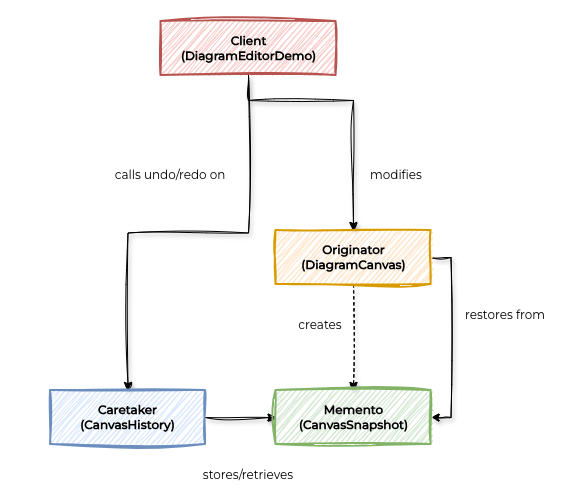
Memento Pattern Components
Core Components
Memento: A snapshot of the originator's state at a specific point in time, immutable and opaque to everyone except the originator.
Originator: The object whose state needs to be saved; creates mementos and uses them to restore its own state.
Caretaker: Manages the history of mementos (undo/redo stacks) without inspecting their contents.
Complete Java Implementation
Let's build a diagram editor that demonstrates the Memento pattern's power in managing state history without polluting the core canvas object.
Memento
class CanvasSnapshot {
    private final String title;
    private final List<String> shapes;

    CanvasSnapshot(String title, List<String> shapes) {
        this.title = title;
        this.shapes = List.copyOf(shapes);
    }

    String getTitle() { return title; }
    List<String> getShapes() { return shapes; }
}
Originator
public class DiagramCanvas {
    private String title;
    private List<String> shapes;

    public DiagramCanvas(String title) {
        this.title = title;
        this.shapes = new ArrayList<>();
    }

    public void addShape(String shape) {
        shapes.add(shape);
    }

    public CanvasSnapshot save() {
        return new CanvasSnapshot(title, shapes);
    }

    public void restore(CanvasSnapshot snapshot) {
        this.title = snapshot.getTitle();
        this.shapes = new ArrayList<>(snapshot.getShapes());
    }

    public void print() {
        System.out.println("  Title  : " + title);
        System.out.println("  Shapes : " + (shapes.isEmpty() ? "(none)" : String.join(", ", shapes)));
    }
}
Caretaker
public class CanvasHistory {
    private Deque<CanvasSnapshot> undoStack = new ArrayDeque<>();
    private Deque<CanvasSnapshot> redoStack = new ArrayDeque<>();

    public void save(DiagramCanvas canvas) {
        undoStack.push(canvas.save());
        redoStack.clear();
        System.out.println("[History] Saved. Undo steps available: " + undoStack.size());
    }

    public void undo(DiagramCanvas canvas) {
        if (undoStack.isEmpty()) {
            System.out.println("[History] Nothing to undo.");
            return;
        }
        redoStack.push(canvas.save());
        canvas.restore(undoStack.pop());
        System.out.println("[History] Undo applied.");
    }

    public void redo(DiagramCanvas canvas) {
        if (redoStack.isEmpty()) {
            System.out.println("[History] Nothing to redo.");
            return;
        }
        undoStack.push(canvas.save());
        canvas.restore(redoStack.pop());
        System.out.println("[History] Redo applied.");
    }
}
Client
public class DiagramEditorDemo {
    public static void main(String[] args) {
        System.out.println("=== Diagram Editor ===\n");

        DiagramCanvas canvas = new DiagramCanvas("Untitled Diagram");
        CanvasHistory history = new CanvasHistory();

        System.out.println("-- Initial canvas --");
        canvas.print();

        System.out.println("\n-- Adding a rectangle --");
        history.save(canvas);
        canvas.addShape("Rectangle: (10, 20, 100x50)");
        canvas.print();

        System.out.println("\n-- Adding a circle --");
        history.save(canvas);
        canvas.addShape("Circle: (150, 30, r=40)");
        canvas.print();

        System.out.println("\n-- Undo --");
        history.undo(canvas);
        canvas.print();

        System.out.println("\n-- Redo --");
        history.redo(canvas);
        canvas.print();
    }
}
Expected Output:
=== Diagram Editor ===

-- Initial canvas --
  Title  : Untitled Diagram
  Shapes : (none)

-- Adding a rectangle --
[History] Saved. Undo steps available: 1
  Title  : Untitled Diagram
  Shapes : Rectangle: (10, 20, 100x50)

-- Adding a circle --
[History] Saved. Undo steps available: 2
  Title  : Untitled Diagram
  Shapes : Rectangle: (10, 20, 100x50), Circle: (150, 30, r=40)

-- Undo --
[History] Undo applied.
  Title  : Untitled Diagram
  Shapes : Rectangle: (10, 20, 100x50)

-- Redo --
[History] Redo applied.
  Title  : Untitled Diagram
  Shapes : Rectangle: (10, 20, 100x50), Circle: (150, 30, r=40)
🚀 Get the Complete Implementation
The full code with incremental saves and versioned snapshot support is available in our Design Patterns Repository.
# Clone and run the complete demo
git clone https://github.com/shift-elevate/design-patterns.git
cd design-patterns
mvn test -Dtest=DiagramEditorMementoTest
Real World Examples
The Memento pattern is used extensively in applications that require state history management:
1. Text Editors and IDEs
Every modern editor uses the Memento pattern under the hood for undo/redo. Each keystroke or save point creates a memento of the buffer's state. The editor's history manager (caretaker) maintains stacks for undo and redo, and the document (originator) knows how to serialize and restore its own state without the history manager ever needing to inspect it.
2. Database Transaction Rollback
Database engines use memento-like mechanisms to implement transaction rollback. Before executing a transaction, the engine captures the affected pages or row states as a memento (the transaction log). If the transaction fails or is explicitly rolled back, the engine restores the pre-transaction state from the log, without the transaction itself knowing how the snapshot is stored.
When to Use the Memento Pattern
Understanding when to apply the Memento pattern is crucial for making the right architectural decisions. Here's when it shines and when alternatives might be better:
✅ Ideal Scenarios:
You need to implement undo/redo functionality.
You want to create snapshots or save points without exposing an object's internals.
A direct interface to an object's state would expose implementation details.
The cost of state snapshots is acceptable relative to the benefit of history management.
You want to keep the originator's class focused on its own responsibilities.
❌ Skip It When:
The object's state is extremely large and snapshotting is too memory-intensive.
State changes are continuous and fine-grained (e.g., every pixel in a video stream).
The originator's internal state cannot be meaningfully serialized or copied.
A simpler command-based history (storing inverse operations) would be more efficient.
Next Steps: Apply the Memento Pattern in Your Project
Ready to implement the Memento pattern in your own projects? Here's a structured approach to get you started:
Identify State to Capture: Find the fields in your originator that define its meaningful state, the ones users would want to undo.
Create the Memento Class: Snapshot those fields immutably. Defensive copy any mutable collections.
Add Save/Restore to the Originator: Implement save() to produce a memento and restore() to apply one, keeping all other logic out.
Build the Caretaker: Use two stacks (undo/redo). Save before each action, clear redo on new actions.
Wire the Client: Call history.save(originator) before modifying state, then let users trigger undo and redo through your UI or API.
The Memento pattern cleanly separates what state looks like from who manages its history. Your originator stays focused on its own domain, your caretaker stays focused on history, and your users get the reliable, intuitive undo/redo experience they expect.